Signed eCoC files, done in two minutes a vehicle.
The VCA needs a signed IVI XML file for every M, N and O vehicle you complete. CoC AutoDocs turns that into a short form your office fills in, then checks, signs and saves the file, ready to upload.
Does your vehicle need an eCoC?
Three questions. Based on the VCA's published guidance for the 29 November 2026 change.
A plain-English summary of the VCA's published guidance, not legal advice. Acceptance is always the VCA's decision.
What changes for your office
Same certificate, same information. A completely different amount of fuss.
BY HANDThe manual VCA portal route
- 30 to 45 minutes per vehicleHand-building the XML, or converting and editing it in a text editor.
- No check until you uploadThe VCA rejects on submission and you rework the file offline.
- A separate signing toolExtra licence, extra steps, every file.
- Corrections by handRe-edit the raw XML with no record of what changed or who changed it.
- Records in spreadsheetsSomewhere on a shared drive, if anyone remembered.
WITH COC AUTODOCSThe same job, done properly
- Two minutes per vehiclePick the model, type the VIN and the numbers, press the button.
- Checked before the file existsAgainst the VCA's own schema, with the wrong box named in plain English.
- Signed automaticallyXAdES, with your company's certificate. Test key built in for the VCA test system.
- Corrections with version numbersFix, reissue, old file marked superseded, the way the VCA expects.
- A history you can auditWho made each file, when, and its status with the VCA. Export for CoP checks.
Build sheet to VCA portal, four steps
Set up once
Company details and your vehicle models: type, variant, version, body code and your usual wording.
Enter the vehicle
Pick the model. Type the VIN and the numbers from the build sheet, or drop a mapped Word certificate.
Check and sign
Validated against the VCA schema, then signed to XAdES. Errors are named before anything is made.
Upload to the VCA
Save the file, upload it through the VCA portal under your own account, mark it accepted.
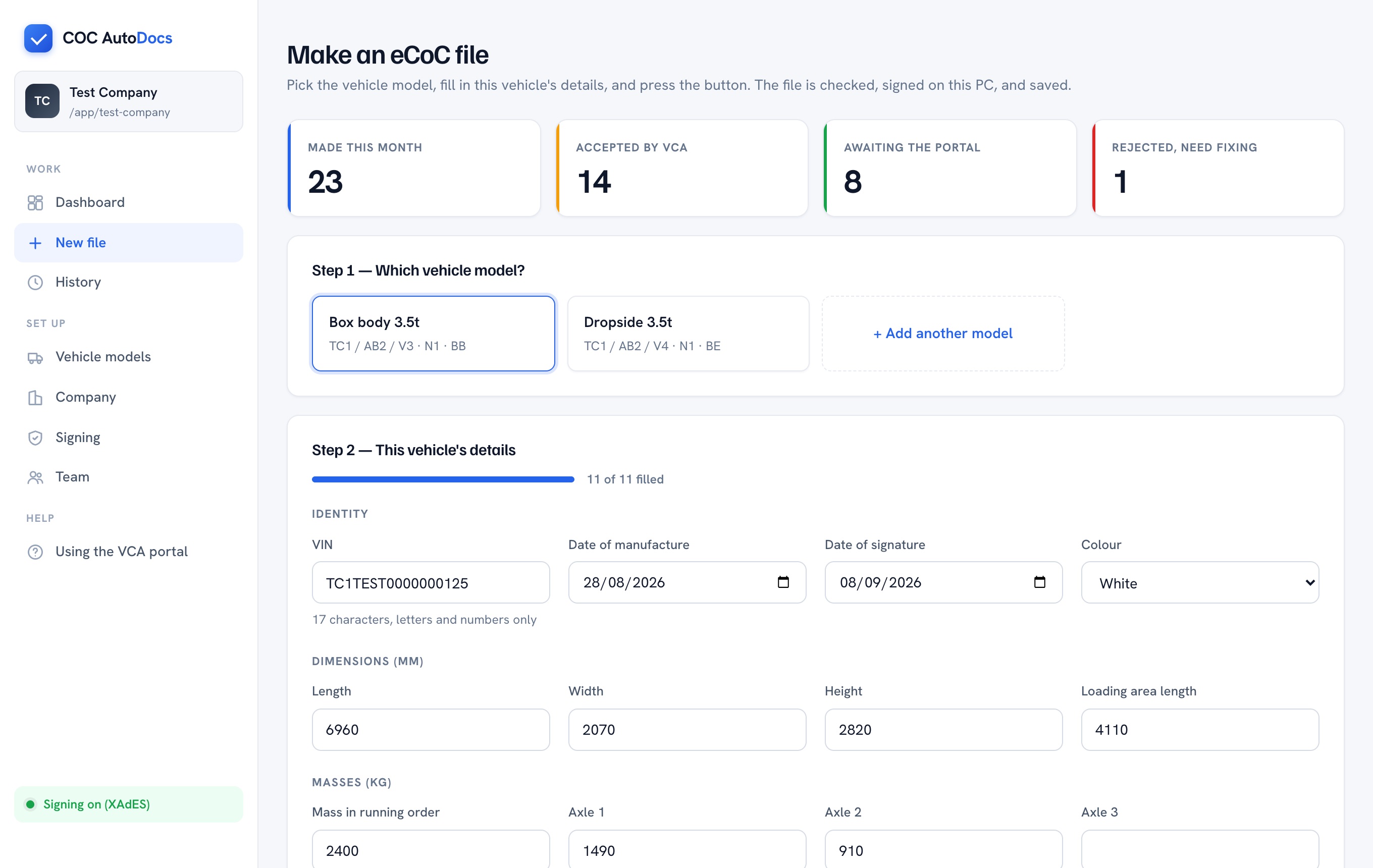
Everything the VCA asks for. Nothing you don't need.
UK IVI XML generation
Built to the VCA's published UK IVI 2.0 schema, with GB and UKNI approval authority codes and the correct scheme.
Digital signatures
XAdES signing, the standard the VCA's guidance points to, applied automatically with your company's electronic seal.
Validation before submission
Field lengths, code lists, dates, VIN format and axle-mass arithmetic all checked before a file exists.
Multi-stage support
Built for stage 2 bodybuilders. Your stage goes in; the base vehicle's data doesn't need to, per the VCA's own guidance.
Audit trail and CoP
Who made each file and when, its status with the VCA, and versioned corrections. Export the history as a spreadsheet.
Hosted in the EU
Nothing to install. Your signing key stays on your PC; your files and history live in an EU data centre.
Built on the rules that apply to you.
Every file CoC AutoDocs makes follows the GB and UKNI type-approval framework and the VCA's own eCoC specification.
GB & UKNI type approval
GB & UKNI type approval
- Road Vehicles (Approval) Regulations 2020 — the GB type-approval scheme: GB unlimited, medium and national small series
- Assimilated Regulation (EU) 2018/858 — the type-approval framework as it applies in Great Britain; Regulation (EU) 2018/858 continues to apply to UKNI approvals
- Assimilated Regulation (EU) 2020/683 — the Certificate of Conformity content and format the file carries
- Assimilated Regulation (EU) No 1230/2012 — masses and dimensions, the numbers the form checks before a file exists
Standards & formats
Standards & formats
- VCA UK IVI 2.0 XML schema — the eCoC format the VCA portal accepts; every file is validated against it before it is made
- XAdES (ETSI EN 319 132) — the advanced electronic signature format the VCA's guidance points to
- UK eIDAS electronic seals — files are signed with the certificate issued to your company, on your own PC
- Multi-stage approval — stage 2 files carry your stage's data and reference the base vehicle, per the VCA's guidance
Data & security
Data & security
- UK GDPR and the Data Protection Act 2018 — the only personal data we hold is your team's work email addresses
- Signing keys never leave your PC — stored as non-extractable keys in your browser; CoC AutoDocs cannot read them and never sees them
- Hosted in the EU — your files and history are stored in an EU data centre, never outside it
- Encrypted in transit — every connection to the app runs over TLS
- No third-party submission — you upload under your own VCA portal login; we never hold your VCA credentials
Regulations named as they apply in Great Britain and Northern Ireland. Checked against the VCA's published schema; acceptance is always the VCA's decision.
Through the VCA portal. First attempt.
Files made this way have been accepted by the VCA's eCoC test portal, on the first upload. Filename hidden.
What the VCA checks
Flat monthly price. No per-certificate fee.
The number is on the page. No demo needed to find out what it costs.
Starter
- Up to 30 vehicles a month
- Unlimited users and PCs
- XAdES signing included
- Email support
Standard
- Up to 150 vehicles a month
- Unlimited users and PCs
- XAdES signing included
- Word template mapping available
- Phone support
Unlimited
- Unlimited vehicles
- Unlimited users and PCs
- XAdES signing included
- Template mapping included
- Same-day phone support
Billed monthly. Annual plans get two months free.
Straight answers
Do we actually have to do this?
If your approval is GB unlimited or GB medium series, yes, for every M, N or O vehicle built from 29 November 2026. National small series approvals are exempt. Vehicles built before 29 November don't need one, even if registered later.
What's the digital signature? We just sign the paper one.
A certificate issued to the company, like an electronic company stamp, that the software uses to seal each file. The VCA reject files without one. You load it into CoC AutoDocs once per PC; a test key is built in for the VCA test system.
Where does our data go?
Your signing key stays on your PC, stored in the browser so it can't be read back out — not even by us. The files you make and your history are stored in an EU data centre, encrypted in transit, and only your team can see them. You upload to the VCA yourself, under your own login.
Can you submit for us?
No, and neither can anyone else: the VCA don't allow third parties to submit on a manufacturer's behalf. You upload under your own portal login, which takes a minute for a batch.
Is this "VCA approved"?
The VCA don't approve software. CoC AutoDocs's files are checked against the VCA's published schema before they're made and signed to the XAdES standard their guidance points to. Acceptance is always the VCA's decision.
Built for more than one site.
Several depots, a dealer group, or an office that makes files for other builders: every plan includes unlimited users and PCs, and every company keeps its own history.
Talk to us- Unlimited users and PCs on every planAdd the office, the workshop and the sales desk. Each PC signs with the company's own key.
- One audit trail per companyWho made each file, when, and its status with the VCA. Export the lot for a CoP check in one click.
- Word template mapping done for youSend us the certificate you use today. Drop it in, and the form fills itself — one file or a whole batch.
Ready before the deadline, not after it.
Set up the company, add your models, make your first file. Most bodybuilders are done the same afternoon, well before the deadline.